Insights from a 2024 survey of StepsWeb users
One concern we often hear from schools considering a new literacy program is whether they have time to implement and maintain it.
StepsWeb has been designed to save educators' time. So to better understand how educators use StepsWeb in practice, we invited users to share their experiences through a voluntary survey. Their responses provide insights into which features they find most valuable and how StepsWeb fits into their daily teaching routines.
Key insights:
Note: This was an anonymous survey so there are no names attributed to the quotes on this page. However, these quotes are all taken directly from real responses in the 2024 survey.
This survey was conducted in 2024, distributed through the StepsWeb newsletter and blog. Participation in the survey was voluntary and anonymous. We received 63 responses in total, primarily from New Zealand educators.
The total population of participants were as follows:
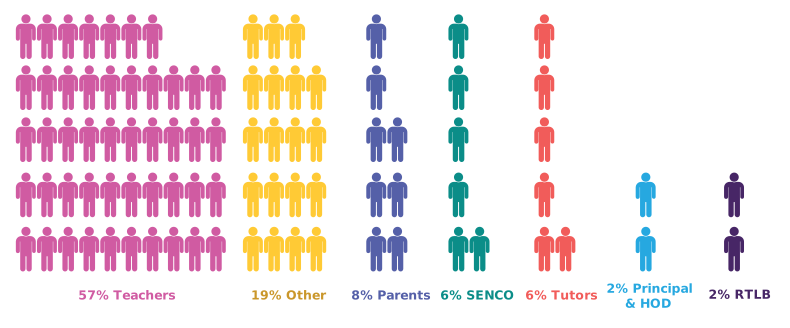
Other consisted of Learning Support Coordinators, Teacher Aides and other support staff. SENCO = Special Educational Needs Coordinator, HOD = Head of Department, RTLB = Resource Teacher: Learning and Behaviour.
The survey included a selection of quantitative and qualitative questions. Quantitative questions were analysed from the overall group. Open-ended responses were reviewed with common themes identified and grouped.
Because participation was voluntary and primarily attracted engaged users, the findings should be interpreted as user perceptions and experiences rather than a representative study of all StepsWeb users.
Time savings reported by users
97% said StepsWeb frees up time for teaching.
When asked: "Do you feel that StepsWeb has freed up time for teaching?" we received the following response:

Nearly all respondents reported that StepsWeb helped create more time for teaching and supporting students.
73% reported saving more than one hour per week.
When asked "On average, how much time does StepsWeb save you per week?" we received the following response:
.png?width=230&height=230&name=download%20(2).png)
Seven out of ten respondents reported saving over one hour per week through their use of StepsWeb.
89% would recommend StepsWeb as a time-saving tool.
When asked "Would you recommend StepsWeb to other educators as a time-saving tool?" we received the following response:


Nine out of ten respondents said they would recommend StepsWeb to other educators as a time-saving tool.
Where does StepsWeb save time?
We asked respondents what tasks StepsWeb saves time on:
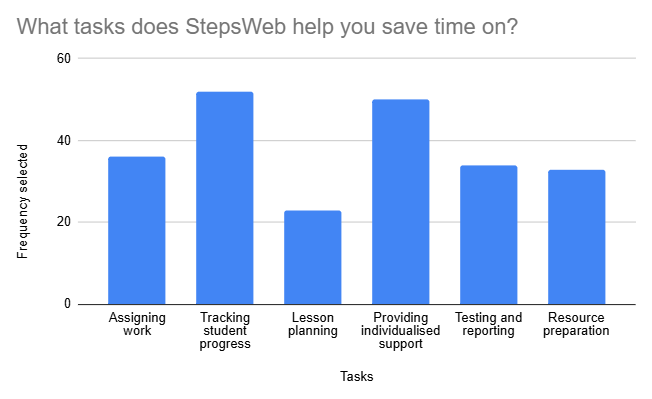
'Tracking student progress' was the most significant task users reported, selected by 83% of participants. This was followed closely by 'Providing individualised support', selected by 79% of participants.
Impact on teaching
We asked respondents "How has the time saved using StepsWeb impacted your ability to focus on other teaching-related tasks?"
We identified several key themes, including:
Teachers' top tips for saving time with StepsWeb
We asked respondents what advice they would give to other educators wanting to save time with StepsWeb. While individual tips varied, several common themes emerged.
1. Make StepsWeb part of your daily routine.
Educators consistently recommended integrating StepsWeb into existing classroom routines. Some educators recommended integrating StepsWeb with reading/writing programs as a rotation, or as part of sustained silent reading, while others mentioned they use it at the start of their literacy lessons.
"I use it at the start of each day and find it helps to set the tone and get students straight into meaningful learning each day."
“Use StepsWeb to help you help your students. Use the resources available. Make it part of your daily program. Reap the benefits of a tried and tested teaching tool!!”
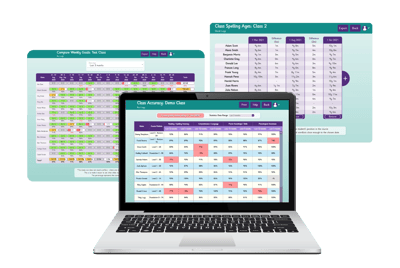
2. Use reporting to target teaching.
Users recommended regularly reviewing reports to quickly identify learning needs and determine where teacher support would have the greatest impact.
This includes the Weekly Goal report emails, which provide teachers with an overview of student usage. Check logs to identify any difficulties with specific words or patterns, and monitor reports to analyse accuracy with a variety of core literacy skills.
"The reports, tracking, and monitoring are a game changer as you can see how students are tracking. If they are struggling you can adapt the number of tasks so it's individualised for students to cater to their needs.”
3. Use StepsWeb to support students at different levels.
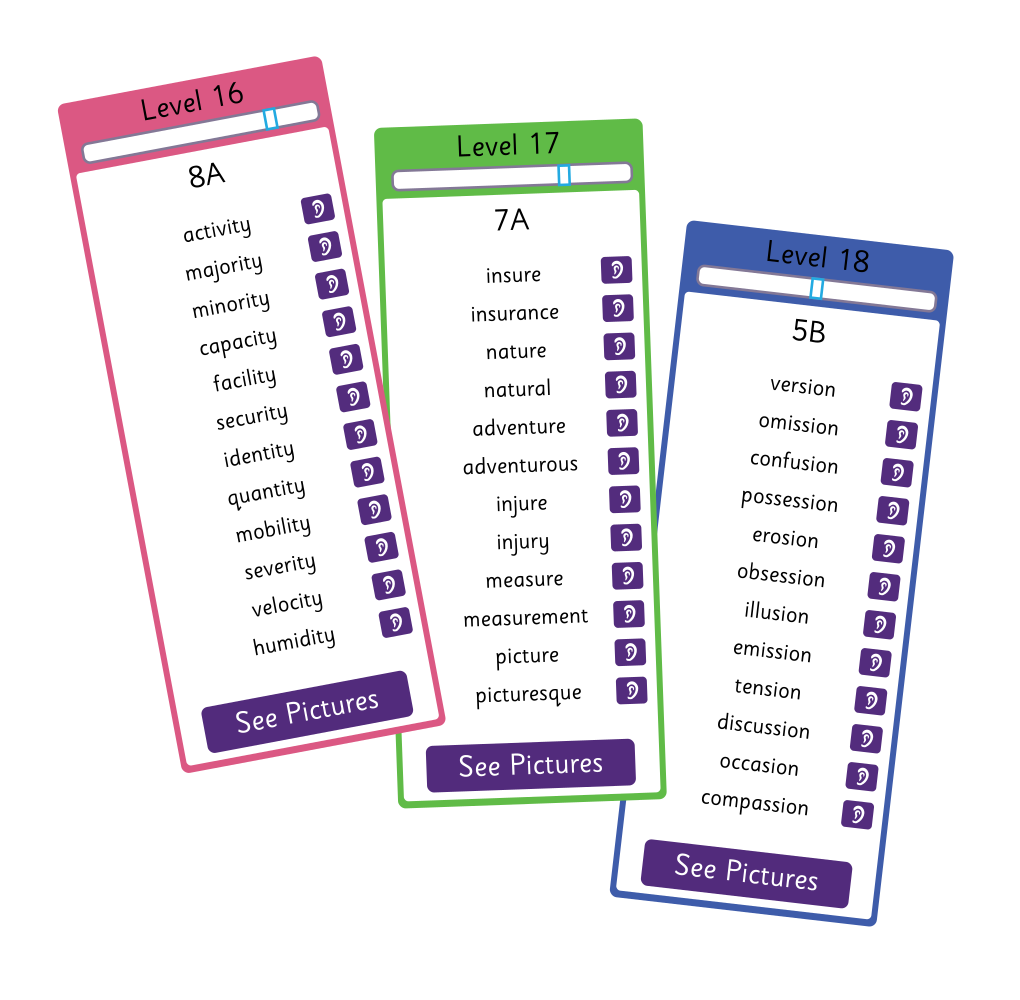
Teachers recommended using StepsWeb to meet a wide range of learner needs, from intervention and English Language Learners (ELL) support through to extension activities.
StepsWeb's printable worksheets were suggested to support students at a variety of levels. These worksheets are automatically generated by the program and provide differentiated content to support each student's current literacy level.
Educators also recommended using the Spelling Test results to group students at similar levels into groups to support targeted teaching. Many teachers felt that StepsWeb was effective for catering to struggling, ELL, and extension learners. Respondents praised the workbooks and other supporting resources for their ability to provide extra reinforcement for students with literacy difficulties.
“Use it daily in class to run your spelling and grammar program along with your reading program. Use it for your ELL lessons and students. Use it to advance students who are below, and at, and above. It is so versatile and the levels are detailed and age-appropriate. It is not only aimed at young learners; older learners find it engaging and the graphics are not too immature.”
4. Build student independence.
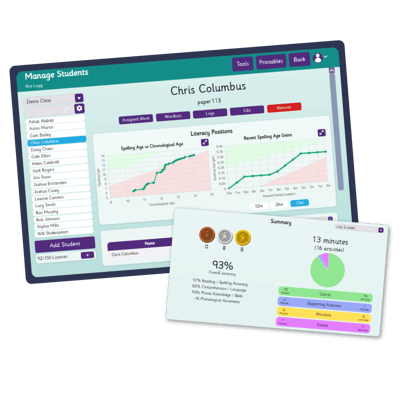
Many responses centred around helping students become confident, independent learners. Educators noted that a small investment in helping students learn the system often reduced the amount of ongoing support required later. This is particularly useful for helping students navigate activities which may require more critical thinking.
Teachers also recommended using the QR code sign-in option to support quick and easy access onto the program for students.
Educators recommended showing students their progress charts on the program. This can have a significant impact on motivation, and gives students a tangible view of their progress.
“I show students their graphs and when they see the graph rising, this encourages them far more than simply verbally telling them they are making progress.”
5. Extend learning beyond the classroom.
Teachers suggested continuing StepsWeb reinforcement beyond in-class literacy lessons through assigning homework, although they emphasised checking that students have access to a device at home.
“It saves me having to find follow-up spelling tasks and activities. Students know where they are at and can continue with the program both in class and at home.”
Overall, the primary recommendations by educators in this survey includes:
Understanding the results
This survey was conducted to better understand how educators use StepsWeb and which aspects of the online program they find most valuable.
Responses were collected voluntarily through the StepsWeb newsletter and blog, with 63 participants contributing their experiences. As with most voluntary surveys, respondents are likely to include users who actively engage with StepsWeb communications.
The findings are based on self-reported experiences and were not designed to measure exact workload changes. Instead, they offer a snapshot of how respondents perceive the impact of StepsWeb on their planning, teaching, monitoring, and student support activities.
The consistency of themes across both quantitative and open-ended responses provide useful insight into how many educators are incorporating StepsWeb into their teaching practice.
What users told us doesn't work well
Some respondents noted that:
These comments reinforce an important principle of the program: StepsWeb is designed to support teaching, not replace it.
By default, StepsWeb requires students to receive a silver medal to continue with the next activity. This ensures the student has a good level of understanding before moving forward.
We recommend teachers encourage their students to complete their Weekly Goals before going back to upgrade their medals from silver to gold. The Live Student Monitoring tool on StepsWeb is useful for seeing student activity in real-time, and can be used to identify students who are progressing happily, struggling and making multiple errors, off-task, or spending too much time repeating the same activities. Learn more about Live Student Monitoring on our Support Site.
There are over 60 different types of activities on StepsWeb. These activities are designed to reinforce and extend student knowledge and ability, and this sometimes requires exposure to tasks which feel challenging. We have a number of scaffolding techniques on our Support Site for activities which are considered more challenging.
It's important for educators using StepsWeb to monitor logs. If a student is making repeated unsuccessful attempts on the same type of activity, they would benefit from teacher guidance. The Student Simulator allows an educator to demonstrate an activity to ensure students understand what's required of them. Live Student Monitoring can be useful to quickly identify students who have made repeated failed attempts during an activity.
One respondent made an insightful comment on using StepsWeb as a time-saving program:
"I think we should see StepsWeb as more of a supportive, enhancing tool that supplements the structured, explicit learning within the classroom. To provide our students who find spelling a challenge an opportunity to work independently within the classroom environment and not singled out. It also provides the structured repetition these students need, with less individual teacher time."
While implementing any new program requires an initial investment of time, respondents described StepsWeb as helping reduce workload through automation, progress tracking, reporting, and differentiated learning support.
Users highly value StepsWeb as it helps them spend less time on administration and more time supporting learners.
Key takeaways:
StepsWeb has the following impacts on teaching:
Respondents recommend the following tips for maximum benefits and efficiency:
Perhaps most importantly, the responses highlight that successful implementation is not about replacing teaching, but about using technology to make teaching more efficient and targeted.